
Vider une pièce virtuellement : supprimer les meubles d'une photo
Le home staging virtuel meuble une pièce vide. Cet outil fait exactement l'inverse : il retire tout le mobilier pour montrer le logement nu, tel que l'acquéreur le recevra le jour de la remise des clés.
Meubles, tapis, rideaux, tableaux, luminaires d'appoint, plantes et objets personnels disparaissent ; tout ce qui est fixe reste — cuisine équipée, placards intégrés, radiateurs, prises, sanitaires, plafonniers. Les sols et les murs révélés sont prolongés dans la même matière que le reste de la pièce.
Mention « Home staging virtuel » incrustée sur chaque rendu
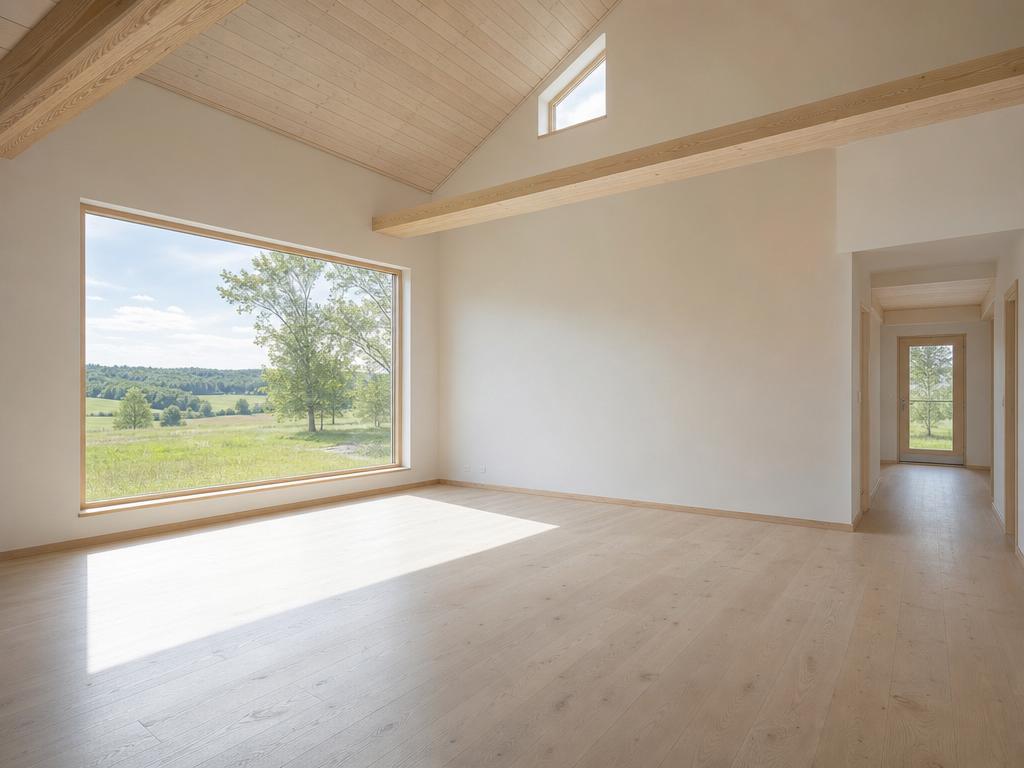 AvantAprès
Quand l'utiliser
- Un bien vendu vide dont les seules photos disponibles montrent encore le mobilier du vendeur
- Un intérieur très chargé ou très personnalisé qui empêche l'acquéreur de se projeter
- Repartir d'une base neutre pour remeubler ensuite dans un tout autre style
- Un investisseur ou un artisan qui veut juger les volumes et l'état réel des surfaces
- Une succession dont le mobilier part avec la famille
- Un local, un bureau ou un plateau à relouer, à présenter nu
Bonnes pratiques
- Le combo le plus utile : vider puis remeubler. Démeublez d'abord, puis appliquez le home staging sur le rendu obtenu — c'est ainsi qu'on restyle intégralement un bien déjà meublé.
- Vérifiez les surfaces révélées. Si un meuble masquait une tache, une fissure ou un parquet abîmé, le rendu affichera une surface propre qui n'existe pas. Dans ce cas, ne publiez pas le visuel sans le signaler.
- Les éléments fixes doivent rester visibles : cuisine équipée, placards intégrés et radiateurs font partie de ce qui est vendu.
- Une photo prise depuis un angle dégagé donne un rendu plus fiable qu'un cadrage saturé de mobilier.
Comment ça marche
- 1
Téléversez votre photo
Importez la photo du bien depuis votre ordinateur ou votre téléphone. Aucun format particulier n'est requis.
- 2
Choisissez le traitement
Sélectionnez « Vider / Démeubler » et le type de pièce à présenter nue.
- 3
Récupérez le rendu
L'image haute résolution est générée en quelques secondes, avec la mention « Home staging virtuel » incrustée, prête à être publiée dans votre annonce.
Questions fréquentes
Quelle différence avec le désencombrement virtuel ?
Le désencombrement retire le désordre — cartons, objets, effets personnels — et conserve le mobilier principal. Cet outil va jusqu'au bout : il retire aussi les meubles, pour ne laisser que la pièce nue.
Est-il légal de supprimer les meubles d'une photo d'annonce ?
Oui. Le mobilier du vendeur ne fait pas partie du bien vendu : montrer la pièce sans lui correspond à ce que l'acquéreur achète réellement. La mention de retouche reste obligatoire, et aucun défaut du logement ne doit disparaître avec les meubles.
L'outil supprime-t-il la cuisine équipée ou les radiateurs ?
Non. Tous les éléments fixés au bâtiment sont conservés : cuisine et placards intégrés, plans de travail, sanitaires, radiateurs, prises, interrupteurs, plafonniers et volets. Seul le mobilier libre et la décoration sont retirés.
Peut-on remeubler la pièce ensuite dans un autre style ?
Oui, et c'est l'usage le plus intéressant. En démeublant puis en appliquant le home staging virtuel sur le rendu, vous pouvez présenter un bien déjà meublé dans n'importe lequel des styles disponibles.
Que se passe-t-il si un meuble cachait une tache au sol ?
Le rendu prolongera le sol environnant, donc la tache n'apparaîtra pas. C'est le point de vigilance de cet outil : vérifiez toujours la photo d'origine, et ne diffusez pas un visuel qui ferait disparaître un défaut réel du logement.
Outils complémentaires
Désencombrement virtuel d'une photo immobilière
Supprime désordre, cartons et effets personnels pour une pièce nette et spacieuse.
DécouvrirModerniser une décoration datée sur photo
Remplace un intérieur démodé par une décoration actuelle, sans toucher aux volumes.
DécouvrirChangement d'usage d'une pièce sur photo
Transformez une pièce en une autre : chambre en bureau, débarras en dressing.
DécouvrirPour aller plus loin
- Home staging virtuel : le guide complet pour vendre plus vite en 2026Définition, bénéfices mesurés, prix, cadre légal français, méthode en 5 étapes et erreurs à éviter : tout ce qu'un professionnel de l'immobilier doit savoir sur le home staging virtuel.
- Faut-il vendre un logement vide ou meublé ? Ce que disent les faitsLe logement vide rassure sur l'état du bien mais empêche l'acquéreur de se projeter. Analyse des deux options, de leur effet réel sur le délai de vente, et de la solution intermédiaire.
Testez sur une photo de votre portefeuille
Les premières générations sont offertes à l'inscription, sans carte bancaire.
Essayer gratuitement