
Modernisation de décoration : rafraîchir un intérieur daté en photo
Un bien bien situé, aux bons volumes, mais figé dans une décoration des années 80 : c'est le mandat qui traîne. L'acquéreur ne voit pas le potentiel, il voit le budget travaux — et il passe à l'annonce suivante.
La modernisation virtuelle de la décoration remplace mobilier, revêtements muraux, luminaires et objets par des équivalents contemporains, en conservant strictement l'architecture : murs, ouvertures, hauteur sous plafond et proportions restent identiques.
Mention « Home staging virtuel » incrustée sur chaque rendu
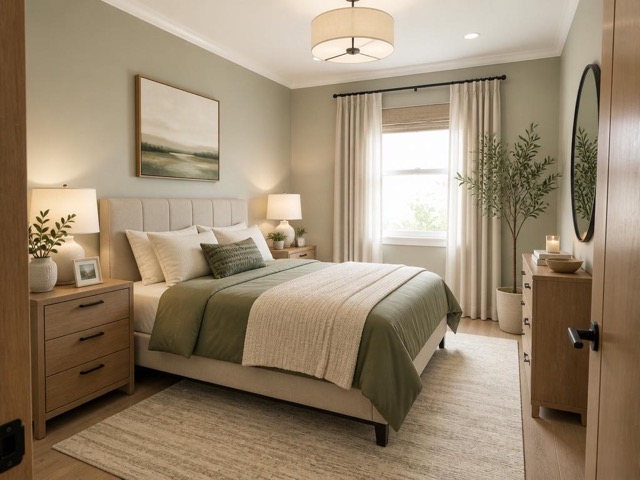 AvantAprès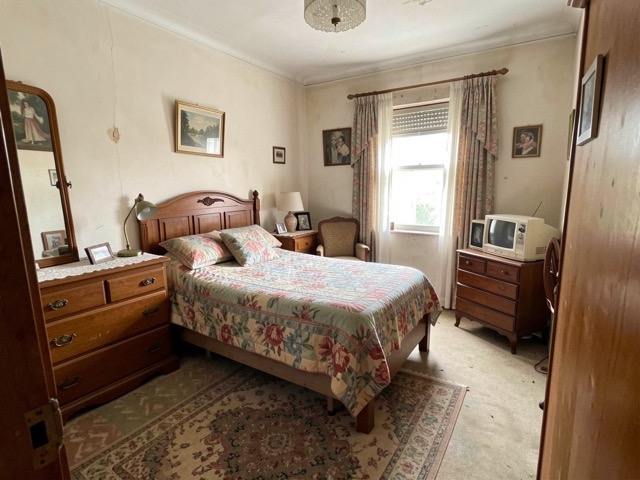
Quand l'utiliser
- Un logement de succession meublé et décoré il y a trente ans
- Un appartement locatif dont l'ameublement dessert la vente
- Un bien correct mais dont la décoration fait fuir la cible visée
- Une maison de famille très personnalisée qui empêche la projection
Bonnes pratiques
- Photographiez la pièce rangée : l'outil modernise, il ne fait pas le ménage — pour cela, utilisez d'abord le désencombrement.
- Choisissez un style cohérent avec l'architecture du bien plutôt qu'avec vos goûts.
- Générez deux variantes et publiez la plus sobre : le neutre convertit mieux que le spectaculaire.
- Conservez au moins une photo non retouchée dans la galerie de l'annonce.
Comment ça marche
- 1
Téléversez votre photo
Importez la photo du bien depuis votre ordinateur ou votre téléphone. Aucun format particulier n'est requis.
- 2
Choisissez le traitement
Sélectionnez la modernisation de la déco, le type de pièce et le style souhaité.
- 3
Récupérez le rendu
L'image haute résolution est générée en quelques secondes, avec la mention « Home staging virtuel » incrustée, prête à être publiée dans votre annonce.
Questions fréquentes
La modernisation virtuelle change-t-elle les murs et les volumes ?
Non. Les cloisons, les ouvertures, la hauteur sous plafond et les proportions de la pièce sont verrouillées à la génération. Seuls les revêtements, le mobilier et la décoration sont remplacés.
Faut-il indiquer que la photo a été modernisée ?
Oui. Toute photo dont la décoration a été modifiée numériquement doit porter une mention visible. Chez Vecting, la mention « Home staging virtuel » est incrustée automatiquement sur chaque rendu.
Puis-je moderniser une pièce encore occupée ?
Oui, mais le résultat est meilleur sur une pièce rangée. Sur un intérieur encombré, commencez par un désencombrement virtuel, puis appliquez la modernisation sur le rendu obtenu.
Outils complémentaires
Rénovation légère virtuelle d'une pièce
Retouches subtiles : la pièce reste reconnaissable, mais plus soignée.
DécouvrirDésencombrement virtuel d'une photo immobilière
Supprime désordre, cartons et effets personnels pour une pièce nette et spacieuse.
DécouvrirChangement d'usage d'une pièce sur photo
Transformez une pièce en une autre : chambre en bureau, débarras en dressing.
DécouvrirPour aller plus loin
- Home staging virtuel : le guide complet pour vendre plus vite en 2026Définition, bénéfices mesurés, prix, cadre légal français, méthode en 5 étapes et erreurs à éviter : tout ce qu'un professionnel de l'immobilier doit savoir sur le home staging virtuel.
- Quel style de décoration choisir pour votre home staging virtuel ?Un haussmannien meublé en industriel sonne faux et fait fuir. Guide d'association entre les huit grands styles de décoration, les typologies de biens et les profils d'acquéreurs visés.
Testez sur une photo de votre portefeuille
Les premières générations sont offertes à l'inscription, sans carte bancaire.
Essayer gratuitement