
Désencombrement virtuel : une pièce nette sur vos photos d'annonce
Le désordre est le premier destructeur de valeur perçue. Une pièce encombrée paraît plus petite, plus sombre, et empêche l'acquéreur de se projeter — il ne voit que les affaires de quelqu'un d'autre.
Le désencombrement virtuel supprime cartons, piles d'objets, câbles apparents et effets personnels tout en conservant le mobilier principal, pour montrer la pièce telle qu'elle serait une fois rangée.
Mention « Home staging virtuel » incrustée sur chaque rendu
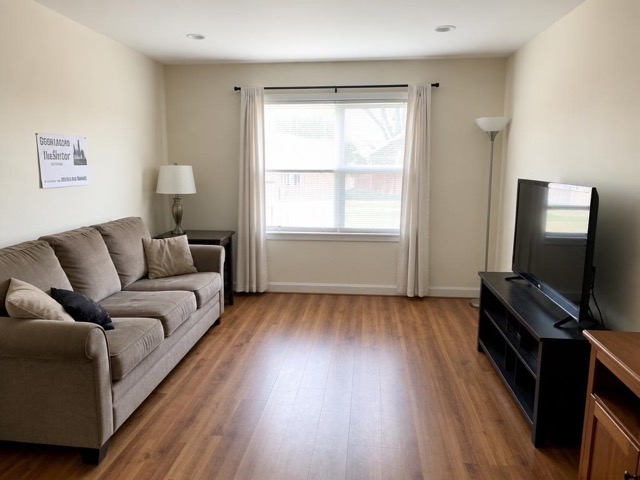 AvantAprès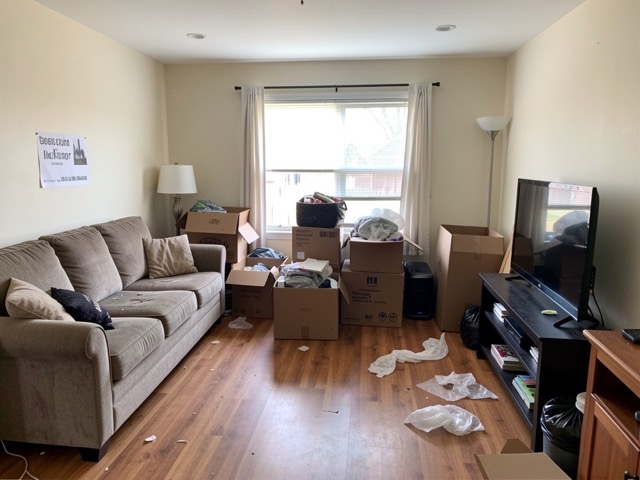
Quand l'utiliser
- Un logement encore occupé par un locataire ou un vendeur
- Un bien en cours de déménagement, cartons empilés dans le séjour
- Une pièce servant de débarras qu'on veut présenter dans son usage réel
- Une visite à distance où l'on ne peut pas faire ranger avant la prise de vue
Bonnes pratiques
- Rangez tout de même le plus gros avant la prise de vue : l'outil travaille mieux sur une base propre.
- Ne demandez jamais la suppression d'un élément du bâti (radiateur, compteur, coffret électrique) : ce n'est plus du désencombrement mais de la dissimulation.
- Vérifiez le rendu à 100 % avant publication, notamment les zones où un objet volumineux a été retiré.
- Enchaînez avec un meublage ou une modernisation si la pièce paraît vide une fois nettoyée.
Comment ça marche
- 1
Téléversez votre photo
Importez la photo du bien depuis votre ordinateur ou votre téléphone. Aucun format particulier n'est requis.
- 2
Choisissez le traitement
Sélectionnez le désencombrement et le type de pièce concerné.
- 3
Récupérez le rendu
L'image haute résolution est générée en quelques secondes, avec la mention « Home staging virtuel » incrustée, prête à être publiée dans votre annonce.
Questions fréquentes
Le désencombrement virtuel supprime-t-il les meubles ?
Non, il conserve le mobilier principal et retire le désordre : cartons, piles d'objets, effets personnels, câbles apparents. Pour retirer aussi les meubles et présenter la pièce nue, utilisez l'outil Vider / Démeubler.
Peut-on effacer une fissure ou une trace d'humidité ?
Non, et l'outil est conçu pour ne pas le faire. Ces éléments constituent des caractéristiques du bien : les supprimer relèverait de la pratique commerciale trompeuse, sanctionnée par le code de la consommation.
Faut-il mentionner qu'une photo a été désencombrée ?
Oui. Toute modification du contenu d'une photo d'annonce doit être signalée. La mention « Home staging virtuel » est ajoutée automatiquement sur chaque rendu Vecting.
Outils complémentaires
Vider une pièce / démeubler une photo
Retire tout le mobilier et la décoration pour révéler les volumes bruts.
DécouvrirDésencombrer un extérieur sur photo immobilière
Supprime poubelles, outils et désordre pour des abords bien tenus.
DécouvrirModerniser une décoration datée sur photo
Remplace un intérieur démodé par une décoration actuelle, sans toucher aux volumes.
DécouvrirPour aller plus loin
- Home staging virtuel : le guide complet pour vendre plus vite en 2026Définition, bénéfices mesurés, prix, cadre légal français, méthode en 5 étapes et erreurs à éviter : tout ce qu'un professionnel de l'immobilier doit savoir sur le home staging virtuel.
- Faut-il vendre un logement vide ou meublé ? Ce que disent les faitsLe logement vide rassure sur l'état du bien mais empêche l'acquéreur de se projeter. Analyse des deux options, de leur effet réel sur le délai de vente, et de la solution intermédiaire.
Testez sur une photo de votre portefeuille
Les premières générations sont offertes à l'inscription, sans carte bancaire.
Essayer gratuitement