
Changement d'usage : transformer une pièce en une autre sur photo
Beaucoup de biens perdent de la valeur parce qu'une pièce est présentée dans un usage qui ne parle pas à l'acquéreur : une chambre borgne, un débarras, une pièce de passage sans fonction claire.
Le changement d'usage retire l'ameublement existant et réaménage la pièce pour un autre usage — bureau, chambre d'enfant, dressing, salle de jeux — pour montrer concrètement ce que l'acquéreur peut en faire.
Mention « Home staging virtuel » incrustée sur chaque rendu
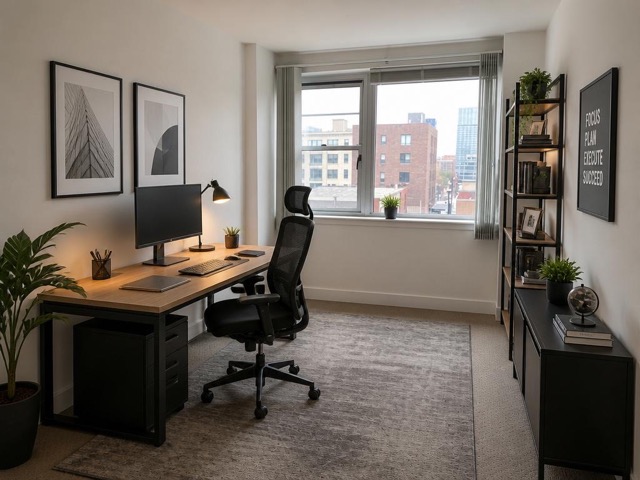 AvantAprès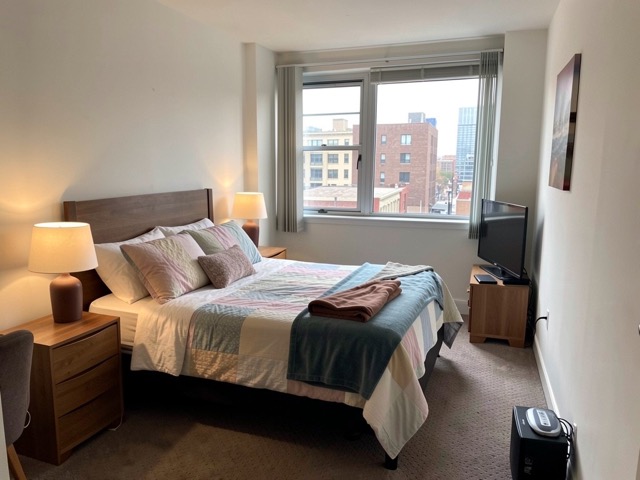
Quand l'utiliser
- Une chambre supplémentaire présentée en bureau pour cibler les télétravailleurs
- Un débarras ou une buanderie transformé en dressing
- Une pièce de passage sans usage identifié
- Un séjour trop grand dont on veut montrer la partie repas
Bonnes pratiques
- Restez plausible : ne montrez pas une chambre dans une pièce sans fenêtre ni surface réglementaire.
- Un seul usage par pièce sur la galerie — proposer trois usages pour la même pièce brouille le message.
- Précisez dans le texte de l'annonce que l'aménagement présenté est une suggestion.
- Gardez une cohérence de style avec le reste des visuels du bien.
Comment ça marche
- 1
Téléversez votre photo
Importez la photo du bien depuis votre ordinateur ou votre téléphone. Aucun format particulier n'est requis.
- 2
Choisissez le traitement
Sélectionnez le changement d'usage, le nouvel usage de la pièce et son style.
- 3
Récupérez le rendu
L'image haute résolution est générée en quelques secondes, avec la mention « Home staging virtuel » incrustée, prête à être publiée dans votre annonce.
Questions fréquentes
Peut-on présenter une pièce dans un usage qu'elle n'a pas ?
Oui, à condition que ce soit réalisable et clairement présenté comme une suggestion d'aménagement. Montrer une chambre dans une pièce sans fenêtre ou sous la surface réglementaire serait en revanche trompeur.
Le changement d'usage supprime-t-il le mobilier existant ?
Oui. La pièce est vidée de son ameublement actuel puis remeublée et décorée pour son nouvel usage, en conservant les volumes, les murs et les ouvertures.
Faut-il l'accord du vendeur ?
C'est recommandé, comme pour tout home staging virtuel. Le plus simple est de prévoir l'usage de ces visuels dans le mandat.
Outils complémentaires
Moderniser une décoration datée sur photo
Remplace un intérieur démodé par une décoration actuelle, sans toucher aux volumes.
DécouvrirRénovation légère virtuelle d'une pièce
Retouches subtiles : la pièce reste reconnaissable, mais plus soignée.
DécouvrirDésencombrement virtuel d'une photo immobilière
Supprime désordre, cartons et effets personnels pour une pièce nette et spacieuse.
DécouvrirPour aller plus loin
- Home staging virtuel : le guide complet pour vendre plus vite en 2026Définition, bénéfices mesurés, prix, cadre légal français, méthode en 5 étapes et erreurs à éviter : tout ce qu'un professionnel de l'immobilier doit savoir sur le home staging virtuel.
- Quel style de décoration choisir pour votre home staging virtuel ?Un haussmannien meublé en industriel sonne faux et fait fuir. Guide d'association entre les huit grands styles de décoration, les typologies de biens et les profils d'acquéreurs visés.
Testez sur une photo de votre portefeuille
Les premières générations sont offertes à l'inscription, sans carte bancaire.
Essayer gratuitement