
Rénovation légère : rafraîchir une pièce sans la dénaturer
Toutes les annonces n'appellent pas une transformation complète. Sur un bien globalement correct, une modernisation trop marquée crée un écart gênant entre la photo et la visite.
La rénovation légère applique des retouches mesurées : finitions murales rafraîchies, textiles et mobilier vieillissants remplacés, espace rangé. La pièce reste immédiatement identifiable — c'est tout l'intérêt.
Mention « Home staging virtuel » incrustée sur chaque rendu
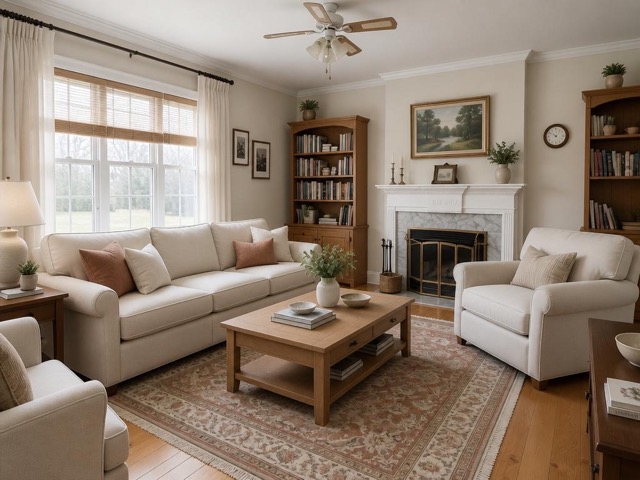 AvantAprès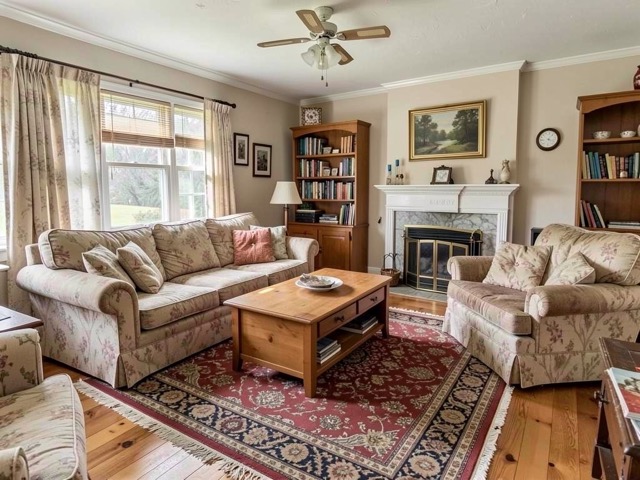
Quand l'utiliser
- Un bien correct mais fatigué, où le potentiel se devine mal en photo
- Un logement dont le vendeur refuse une mise en scène trop marquée
- Un bien déjà visité plusieurs fois, dont on veut relancer l'annonce
- Un mandat où l'écart annonce/réalité doit rester minimal
Bonnes pratiques
- Choisissez cet outil plutôt que la modernisation quand le bien est déjà en bon état.
- Comparez systématiquement l'original et le rendu : si vous ne reconnaissez pas la pièce, le traitement est trop fort.
- Idéal en complément d'une amélioration d'image sur les autres photos de la galerie.
- Gardez le même parti pris sur toutes les pièces du bien.
Comment ça marche
- 1
Téléversez votre photo
Importez la photo du bien depuis votre ordinateur ou votre téléphone. Aucun format particulier n'est requis.
- 2
Choisissez le traitement
Sélectionnez la rénovation légère, le type de pièce et le style souhaité.
- 3
Récupérez le rendu
L'image haute résolution est générée en quelques secondes, avec la mention « Home staging virtuel » incrustée, prête à être publiée dans votre annonce.
Questions fréquentes
Quelle différence avec la modernisation de la décoration ?
La modernisation remplace l'ensemble de la décoration par un intérieur contemporain. La rénovation légère se contente de rafraîchir : mêmes repères visuels, finitions et textiles remis à niveau. L'écart avec la réalité est volontairement plus faible.
Le bien reste-t-il reconnaissable en visite ?
Oui, c'est l'objectif de cet outil. Il est conçu pour les mandats où l'on veut valoriser sans créer de décalage entre l'annonce et la visite.
La mention est-elle obligatoire même pour des retouches légères ?
Oui. Dès lors que le contenu de l'image est modifié, la mention s'impose. Seules les corrections purement techniques (exposition, netteté, balance des blancs) y échappent.
Outils complémentaires
Moderniser une décoration datée sur photo
Remplace un intérieur démodé par une décoration actuelle, sans toucher aux volumes.
DécouvrirAméliorer une photo immobilière (lumière, netteté)
Corrige exposition, couleurs et netteté sans rien ajouter ni supprimer.
DécouvrirDésencombrement virtuel d'une photo immobilière
Supprime désordre, cartons et effets personnels pour une pièce nette et spacieuse.
DécouvrirPour aller plus loin
- Home staging virtuel : le guide complet pour vendre plus vite en 2026Définition, bénéfices mesurés, prix, cadre légal français, méthode en 5 étapes et erreurs à éviter : tout ce qu'un professionnel de l'immobilier doit savoir sur le home staging virtuel.
- Photos immobilières : 12 règles pour une annonce qui déclenche des visitesLa photo de couverture décide en trois secondes si votre annonce est ouverte ou ignorée. Réglages, cadrage, lumière, ordre de la galerie et retouches autorisées : la check-list terrain.
Testez sur une photo de votre portefeuille
Les premières générations sont offertes à l'inscription, sans carte bancaire.
Essayer gratuitement