
Amélioration d'image : des photos immobilières nettes et lumineuses
Beaucoup de photos d'annonce ne souffrent d'aucun problème de contenu : elles sont simplement sous-exposées, ternes ou légèrement floues. Sur un portail où les vignettes s'enchaînent, cela suffit à faire passer le bien inaperçu.
L'amélioration d'image corrige exposition, équilibre des couleurs, contraste et netteté, sans rien ajouter ni retirer de la scène. C'est une correction technique, pas une mise en scène.
Mention « Home staging virtuel » incrustée sur chaque rendu
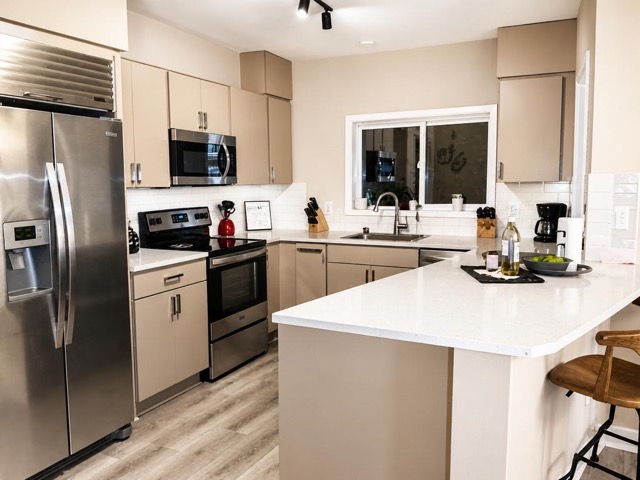 AvantAprès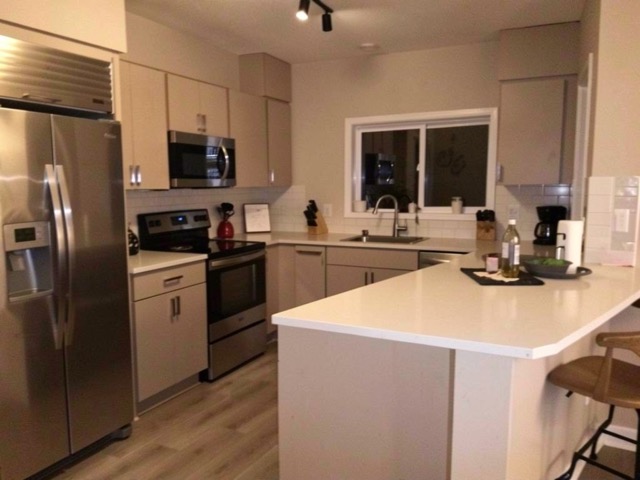
Quand l'utiliser
- Une pièce photographiée en intérieur sombre ou en contre-jour
- Des photos prises au smartphone, un peu ternes
- Une galerie aux teintes hétérogènes à homogénéiser
- Une annonce ancienne à rafraîchir avant relance
Bonnes pratiques
- Utilisez cet outil sur toutes les photos de la galerie pour une cohérence d'ensemble.
- Il ne rattrape pas une photo floue de mouvement ni un cadrage raté : la prise de vue reste déterminante.
- Sur un bien vide, complétez par un meublage virtuel des trois ou quatre visuels clés.
- Consultez les 12 règles de la photo immobilière pour améliorer la source.
Comment ça marche
- 1
Téléversez votre photo
Importez la photo du bien depuis votre ordinateur ou votre téléphone. Aucun format particulier n'est requis.
- 2
Choisissez le traitement
Sélectionnez l'amélioration d'image pour corriger lumière, couleurs et netteté.
- 3
Récupérez le rendu
L'image haute résolution est générée en quelques secondes, avec la mention « Home staging virtuel » incrustée, prête à être publiée dans votre annonce.
Questions fréquentes
L'amélioration d'image modifie-t-elle le contenu de la photo ?
Non. Aucun objet n'est ajouté, déplacé ou supprimé. Seuls l'exposition, la balance des couleurs, le contraste et la netteté sont ajustés — l'équivalent d'un développement photo soigné.
Ce type de retouche doit-il être mentionné ?
Les corrections purement techniques n'appellent pas de mention particulière, contrairement au home staging virtuel. Les rendus Vecting portent néanmoins la mention par défaut, ce qui reste l'option la plus prudente.
Peut-on rattraper une photo très sombre ?
Dans une certaine mesure. Une sous-exposition modérée se corrige bien ; une photo très sombre remonte avec du bruit numérique visible. Mieux vaut refaire la prise de vue volets ouverts et lumières allumées.
Outils complémentaires
Remplacer un ciel gris sur une photo immobilière
Remplace un ciel gris par un ciel bleu, avec une lumière cohérente.
DécouvrirRénovation légère virtuelle d'une pièce
Retouches subtiles : la pièce reste reconnaissable, mais plus soignée.
DécouvrirDésencombrement virtuel d'une photo immobilière
Supprime désordre, cartons et effets personnels pour une pièce nette et spacieuse.
DécouvrirPour aller plus loin
Testez sur une photo de votre portefeuille
Les premières générations sont offertes à l'inscription, sans carte bancaire.
Essayer gratuitement