
Remplacement de ciel : un extérieur lumineux même par temps gris
C'est la retouche la plus simple et l'une des plus efficaces : à cadrage identique, une façade sous un ciel bleu obtient nettement plus de clics que la même façade sous un ciel blanc de novembre.
L'outil remplace le ciel et réajuste l'éclairage global et les ombres pour que la scène reste cohérente — c'est ce dernier point qui distingue un rendu crédible d'un collage visible.
Mention « Home staging virtuel » incrustée sur chaque rendu
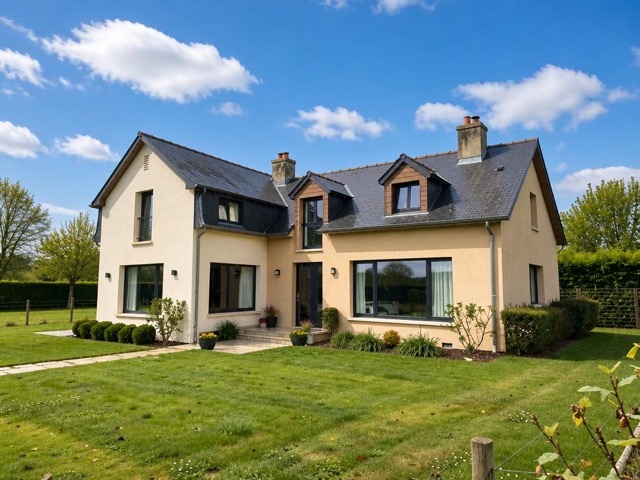 AvantAprès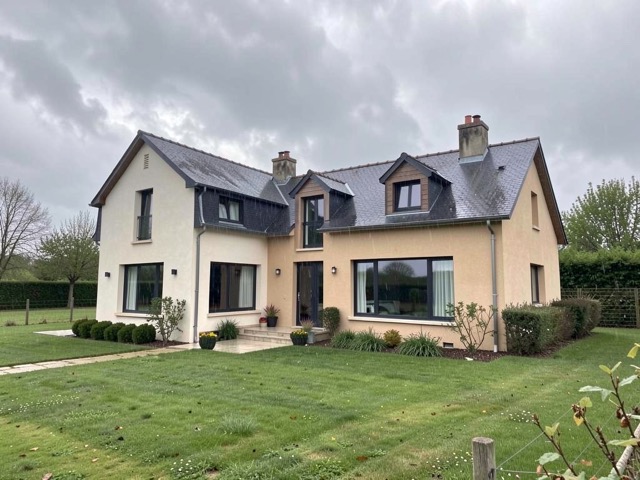
Quand l'utiliser
- Une prise de vue impossible à reporter, réalisée par temps couvert
- Une photo de façade correcte mais plombée par un ciel blanc
- Un jardin ou une terrasse photographiés en hiver
- Une série de photos aux ciels hétérogènes qu'on veut homogénéiser
Bonnes pratiques
- Photographiez malgré la météo : un ciel se remplace, une pièce sous-exposée ne se rattrape pas.
- Restez sur un ciel légèrement nuageux plutôt qu'un bleu uniforme : c'est plus naturel.
- Vérifiez la cohérence des ombres au sol avant publication.
- Appliquez le même traitement à toutes les photos d'extérieur de l'annonce.
Comment ça marche
- 1
Téléversez votre photo
Importez la photo du bien depuis votre ordinateur ou votre téléphone. Aucun format particulier n'est requis.
- 2
Choisissez le traitement
Sélectionnez le remplacement du ciel sur votre photo d'extérieur.
- 3
Récupérez le rendu
L'image haute résolution est générée en quelques secondes, avec la mention « Home staging virtuel » incrustée, prête à être publiée dans votre annonce.
Questions fréquentes
Remplacer un ciel doit-il être signalé dans l'annonce ?
Le remplacement de ciel modifie le contenu de l'image et non un simple réglage technique : la mention reste donc la pratique prudente, et la mention « Home staging virtuel » est apposée automatiquement sur les rendus Vecting.
Le rendu reste-t-il crédible ?
Oui, à condition que la lumière suive. L'outil ajuste l'éclairage global et les ombres pour rester cohérent avec le nouveau ciel, ce qui évite l'effet de découpe caractéristique des montages approximatifs.
Peut-on l'utiliser sur une photo prise de nuit ?
Non, l'outil est prévu pour les prises de vue de jour. Pour une ambiance de fin de journée, utilisez plutôt le passage jour → crépuscule.
Outils complémentaires
Transformer une photo de jour en crépuscule
Transforme une photo de jour en scène de crépuscule chaleureuse.
DécouvrirChanger la saison sur une photo immobilière
Passe une photo d'automne ou d'hiver en scène estivale verdoyante.
DécouvrirAméliorer une photo immobilière (lumière, netteté)
Corrige exposition, couleurs et netteté sans rien ajouter ni supprimer.
DécouvrirPour aller plus loin
Testez sur une photo de votre portefeuille
Les premières générations sont offertes à l'inscription, sans carte bancaire.
Essayer gratuitement