
Changement de saison : passer une photo d'hiver en scène estivale
Un bien mis en vente en janvier est photographié avec des arbres nus, une pelouse jaunie et une lumière rase. Le même bien photographié en juin paraît deux fois plus attractif — pour un extérieur strictement identique.
Le changement de saison rend la végétation dense et verte et réchauffe la lumière, sans toucher au bâti, aux limites de terrain ni aux structures existantes.
Mention « Home staging virtuel » incrustée sur chaque rendu
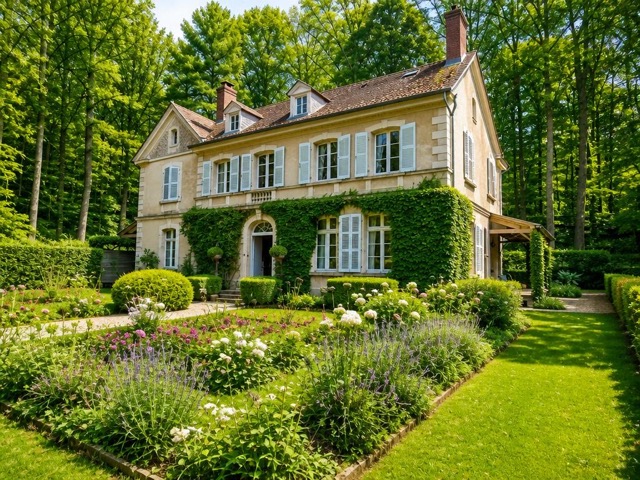 AvantAprès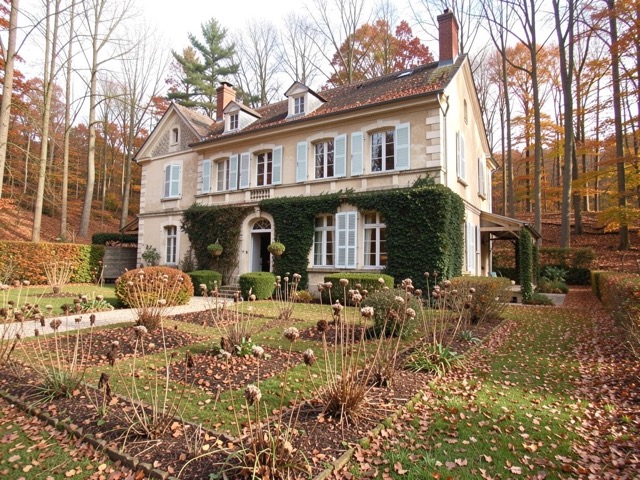
Quand l'utiliser
- Une mise en vente hivernale sur une maison avec jardin
- Un bien dont la valeur repose largement sur l'extérieur
- Une photo d'archive prise en mauvaise saison, seule disponible
- Une annonce à relancer sans repasser sur place
Bonnes pratiques
- Reste cohérent avec la région : la végétation doit correspondre au climat local.
- Ne l'utilisez pas pour masquer un extérieur en mauvais état — pour cela, le désencombrement extérieur et l'aménagement paysager sont les bons outils.
- Évitez de mélanger dans une même annonce des photos d'été et des photos d'hiver.
- Idéal en combinaison avec un remplacement de ciel.
Comment ça marche
- 1
Téléversez votre photo
Importez la photo du bien depuis votre ordinateur ou votre téléphone. Aucun format particulier n'est requis.
- 2
Choisissez le traitement
Sélectionnez le changement de saison sur votre photo d'extérieur.
- 3
Récupérez le rendu
L'image haute résolution est générée en quelques secondes, avec la mention « Home staging virtuel » incrustée, prête à être publiée dans votre annonce.
Questions fréquentes
Peut-on montrer un jardin en été sur une annonce publiée en hiver ?
Oui, avec une mention visible signalant que le visuel est une mise en scène. La végétation présentée doit rester cohérente avec la réalité du terrain et de la région.
Le bâti est-il modifié ?
Non. Seules la végétation et l'ambiance lumineuse changent. Le bâtiment, les clôtures, les terrasses et les limites de propriété sont conservés à l'identique.
Quelle différence avec l'aménagement paysager ?
Le changement de saison verdit ce qui existe déjà ; l'aménagement paysager ajoute des végétaux et des éléments de jardin sur un terrain nu ou négligé.
Outils complémentaires
Aménagement paysager virtuel sur photo
Ajoute arbres, massifs et pelouse à un extérieur nu ou négligé.
DécouvrirRemplacer un ciel gris sur une photo immobilière
Remplace un ciel gris par un ciel bleu, avec une lumière cohérente.
DécouvrirDésencombrer un extérieur sur photo immobilière
Supprime poubelles, outils et désordre pour des abords bien tenus.
DécouvrirPour aller plus loin
Testez sur une photo de votre portefeuille
Les premières générations sont offertes à l'inscription, sans carte bancaire.
Essayer gratuitement