
Aménagement paysager virtuel : un extérieur qui donne envie
Un terrain nu, une pelouse grillée ou un jardin à l'abandon coûtent cher en perception : l'acquéreur voit du travail, pas un espace de vie. Or l'extérieur est souvent l'argument numéro un d'une maison.
L'aménagement paysager virtuel ajoute arbres, arbustes, massifs et pelouse saine à l'échelle du terrain réel, en conservant le bâti, les limites de propriété et le relief.
Mention « Home staging virtuel » incrustée sur chaque rendu
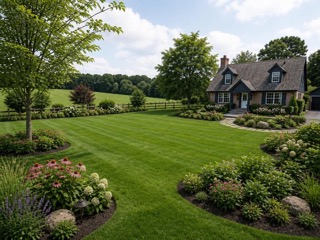 AvantAprès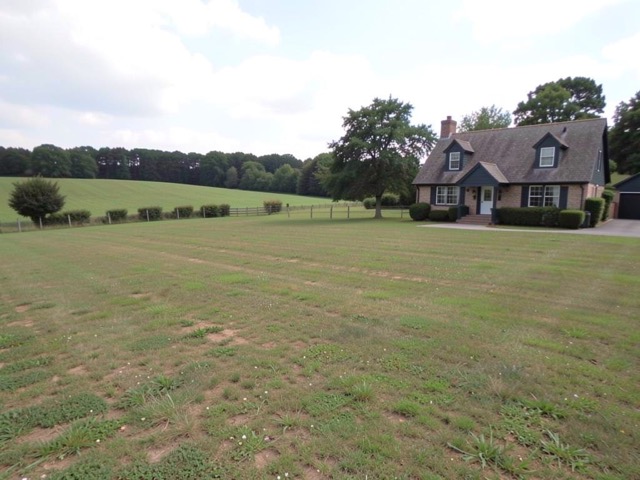
Quand l'utiliser
- Une maison neuve livrée avec un terrain nu
- Un jardin photographié en hiver ou en période de sécheresse
- Un extérieur laissé à l'abandon dans un bien de succession
- Un terrain constructible dont il faut montrer le potentiel
Bonnes pratiques
- Restez cohérent avec la région et le climat : une végétation méditerranéenne sur un bien normand se repère immédiatement.
- Ne masquez jamais un vis-à-vis, un pylône ou une nuisance visible avec de la végétation ajoutée.
- Combinez avec un remplacement de ciel pour une photo prise par temps couvert.
- Une seule photo d'extérieur mise en scène suffit : gardez les autres brutes.
Comment ça marche
- 1
Téléversez votre photo
Importez la photo du bien depuis votre ordinateur ou votre téléphone. Aucun format particulier n'est requis.
- 2
Choisissez le traitement
Sélectionnez l'aménagement paysager pour l'extérieur à végétaliser.
- 3
Récupérez le rendu
L'image haute résolution est générée en quelques secondes, avec la mention « Home staging virtuel » incrustée, prête à être publiée dans votre annonce.
Questions fréquentes
Peut-on ajouter de la végétation sur une photo d'annonce ?
Oui, avec une mention visible indiquant que le visuel est une mise en scène. En revanche, il est interdit d'utiliser la végétation pour masquer un vis-à-vis, une construction voisine ou toute autre nuisance visible.
L'outil respecte-t-il les limites du terrain ?
Oui. Le bâti, les clôtures et le relief sont conservés ; seules la végétation et les éléments de jardin sont ajoutés, à l'échelle du terrain existant.
Fonctionne-t-il sur une photo prise en hiver ?
Oui. Pour un rendu estival complet, le changement de saison est souvent plus adapté ; les deux outils sont complémentaires.
Outils complémentaires
Ajouter une piscine sur une photo de terrain
Ajoute une piscine réaliste, dimensionnée pour le terrain existant.
DécouvrirDésencombrer un extérieur sur photo immobilière
Supprime poubelles, outils et désordre pour des abords bien tenus.
DécouvrirChanger la saison sur une photo immobilière
Passe une photo d'automne ou d'hiver en scène estivale verdoyante.
DécouvrirPour aller plus loin
- Photos immobilières : 12 règles pour une annonce qui déclenche des visitesLa photo de couverture décide en trois secondes si votre annonce est ouverte ou ignorée. Réglages, cadrage, lumière, ordre de la galerie et retouches autorisées : la check-list terrain.
- Home staging virtuel : le guide complet pour vendre plus vite en 2026Définition, bénéfices mesurés, prix, cadre légal français, méthode en 5 étapes et erreurs à éviter : tout ce qu'un professionnel de l'immobilier doit savoir sur le home staging virtuel.
Testez sur une photo de votre portefeuille
Les premières générations sont offertes à l'inscription, sans carte bancaire.
Essayer gratuitement