
Rénovation de façade virtuelle : redonner de l'allure à un bien
La façade est la première photo de l'annonce, donc la vignette qui décide du clic. Un enduit taché, des volets écaillés ou des boiseries fatiguées suffisent à faire passer un bien sain pour une ruine.
La rénovation de façade virtuelle montre le bâtiment avec un ravalement réalisé : enduit ou peinture homogène, murs nettoyés, menuiseries restaurées. Les volumes, les ouvertures et l'architecture ne bougent pas.
Mention « Home staging virtuel » incrustée sur chaque rendu
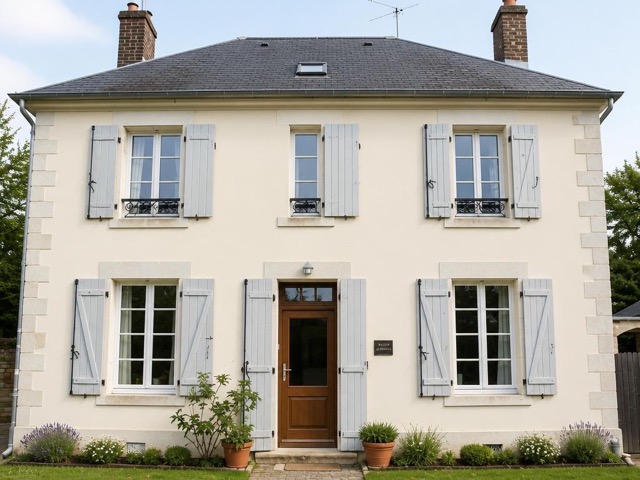 AvantAprès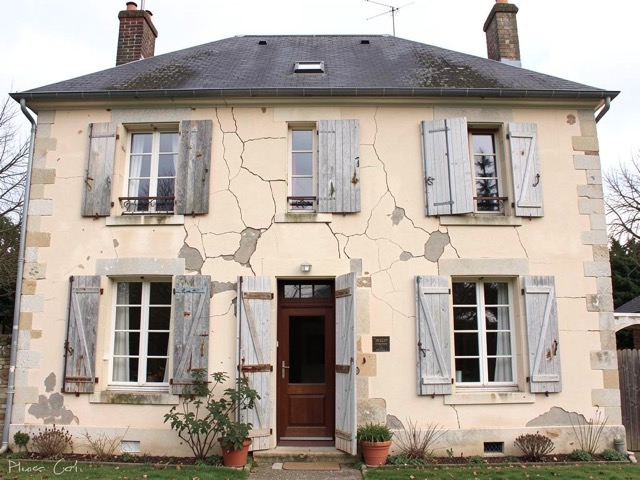
Quand l'utiliser
- Une maison saine dont la façade n'a pas été ravalée depuis vingt ans
- Un bien dont le ravalement est voté mais pas encore réalisé
- Un immeuble de rapport présenté à des investisseurs
- Une maison de village au potentiel invisible sous la patine
Bonnes pratiques
- Restez dans les teintes autorisées par le règlement local d'urbanisme, surtout en secteur protégé.
- Si un ravalement est voté en copropriété, mentionnez-le dans l'annonce : le rendu devient une information utile plutôt qu'une promesse.
- Ne supprimez ni fissure structurelle, ni élément mitoyen, ni réseau apparent.
- Complétez par un remplacement de ciel si la photo a été prise par temps gris.
Comment ça marche
- 1
Téléversez votre photo
Importez la photo du bien depuis votre ordinateur ou votre téléphone. Aucun format particulier n'est requis.
- 2
Choisissez le traitement
Sélectionnez la rénovation de façade sur la photo du bâtiment.
- 3
Récupérez le rendu
L'image haute résolution est générée en quelques secondes, avec la mention « Home staging virtuel » incrustée, prête à être publiée dans votre annonce.
Questions fréquentes
Peut-on montrer une façade rénovée qui ne l'est pas encore ?
Oui, si le visuel est clairement présenté comme une projection et que la photo d'origine reste disponible. C'est particulièrement pertinent lorsqu'un ravalement est déjà voté ou budgété.
L'outil modifie-t-il l'architecture du bâtiment ?
Non. Les volumes, les ouvertures, les toitures et les éléments structurels sont conservés. Seuls l'état de surface et les finitions sont représentés rénovés.
Peut-on masquer une fissure sur la façade ?
Non. Une fissure est une caractéristique du bien susceptible d'influencer la décision d'achat ; la supprimer relèverait de la dissimulation d'un défaut.
Outils complémentaires
Remplacer un ciel gris sur une photo immobilière
Remplace un ciel gris par un ciel bleu, avec une lumière cohérente.
DécouvrirProjection après rénovation sur photo
Visualisez un bien en travaux comme s'il était entièrement rénové.
DécouvrirDésencombrer un extérieur sur photo immobilière
Supprime poubelles, outils et désordre pour des abords bien tenus.
DécouvrirPour aller plus loin
- Home staging virtuel : que dit la loi française en 2026 ? (mentions, DGCCRF, AI Act)Le home staging virtuel est légal, mais encadré. Ce qu'il faut afficher, ce qu'il est interdit de retoucher, et ce qui change depuis l'entrée en application de l'article 50 du règlement européen sur l'IA le 2 août 2026.
- Photos immobilières : 12 règles pour une annonce qui déclenche des visitesLa photo de couverture décide en trois secondes si votre annonce est ouverte ou ignorée. Réglages, cadrage, lumière, ordre de la galerie et retouches autorisées : la check-list terrain.
Testez sur une photo de votre portefeuille
Les premières générations sont offertes à l'inscription, sans carte bancaire.
Essayer gratuitement